Randomness & NoiseRND-03
Worley Noise
Scatter points, measure distances — and out come cells, scales and cracked ground.
- Running time
- O(pixels)
- The question
- How far is the nearest point?
- Neighbourhood
- 9 cells per pixel
- Tileable
- yes, seamlessly
01What it is about
Perlin noise gives soft hills. Worley noise gives cells. Steven Worley described it in 1996, and the idea fits into one sentence: scatter points across the surface and ask at every pixel how far away the nearest of them is.
That is all there is to it — and still everything falls out of it that looks cellular in nature: honeycombs, cracked mud, scales, stone walls, the flicker of light on the floor of a swimming pool. It can also be seen the other way round: Worley noise is a Voronoi diagram that is never drawn as a diagram, only read out as a field of distances.
02How it works
The points in a grid
Searching through all the points would be expensive. So the surface is divided into a grid of cells and exactly one point is thrown into each of them, anywhere inside. For a pixel only its own cell and the eight around it can matter then — nine distances instead of a thousand. Anything further away is further away by construction.
The throwing itself matters: without that random offset inside the cell the result would be a visible grid.
F1, F2 and the actual trick
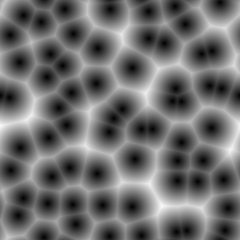
The distance to the nearest point is called F1. It is small near a point and large in between — which gives soft blobs.
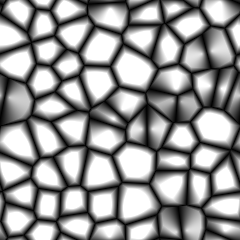
It gets interesting with the second nearest point, F2. Exactly on the border between two points both distances are equal, so F2 − F1 is zero there. That difference draws the borders of the cells as thin dark lines: veins, cracks, honeycombs. One picture, three more lines of code.
Other common combinations:
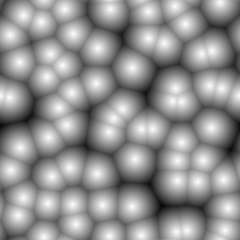
1 − F1— scales and bubbles, bright in the middleF1 · F2— soft lumps with dark joints- several octaves as with Perlin — fine stone instead of large tiles
Seamless
While looking through the neighbouring cells the index wraps around the border with a modulo, while the position of the point stays outside. That makes the left edge fit the right one and the top fit the bottom: the texture can be tiled as often as one likes without the seam showing. For games that is the difference between usable and useless.
Which distance?
What is used here is the ordinary Euclidean distance. Take the Manhattan distance instead and the round cells turn into angular tiles; with the Chebyshev distance they become squares. The same points, the same nine comparisons — a different world.
03Try it
04Implementation
// Steven Worley wrote this down in 1996, and it is the counterpart to Perlin noise.
// Perlin gives soft hills, Worley gives cells: scatter points across the picture and
// ask at every pixel how far away the nearest of them is. Near a point the answer is
// small, in between it is large - and out of that come honeycombs, cracked mud,
// scales, stone, water caustics.
public static class WorleyNoise
{
    // cells says how many points there are in each direction. order picks which
    // point is asked for: 1 is the nearest, 2 the second nearest.
    // The result runs from 0 to 1 and repeats seamlessly at the edges.
    public static float[] Generate(int width, int height, int cells, ulong seed, int order = 1)
    {
        ArgumentOutOfRangeException.ThrowIfLessThan(order, 1);

        var points = Scatter(cells, seed);
        var cellWidth = (float)width / cells;
        var cellHeight = (float)height / cells;
        var noise = new float[width * height];
        var distances = new float[9];

        for (var y = 0; y < height; y++)
        {
            for (var x = 0; x < width; x++)
            {
                var cellX = (int)(x / cellWidth);
                var cellY = (int)(y / cellHeight);
                var found = 0;

                // Only the nine cells around the pixel can hold the nearest point.
                // Everything further away is further away by construction.
                for (var offsetY = -1; offsetY <= 1; offsetY++)
                {
                    for (var offsetX = -1; offsetX <= 1; offsetX++)
                    {
                        // The modulo makes the picture repeat: a point falling off
                        // the right edge comes back in on the left.
                        var neighbourX = (cellX + offsetX + cells) % cells;
                        var neighbourY = (cellY + offsetY + cells) % cells;
                        var point = (neighbourY * cells + neighbourX) * 2;

                        var pointX = (cellX + offsetX + points[point]) * cellWidth;
                        var pointY = (cellY + offsetY + points[point + 1]) * cellHeight;

                        var dx = x - pointX;
                        var dy = y - pointY;

                        distances[found++] = MathF.Sqrt(dx * dx + dy * dy);
                    }
                }

                Array.Sort(distances, 0, found);

                // Divided by the size of a cell, so that the numbers stay the same
                // no matter how large the picture is.
                noise[y * width + x] = Math.Min(distances[order - 1] / cellWidth, 1f);
            }
        }

        return noise;
    }

    // One point per cell, placed somewhere inside it. Without that jitter the
    // pattern would be a plain grid.
    private static float[] Scatter(int cells, ulong seed)
    {
        var random = new Pcg(seed);
        var points = new float[cells * cells * 2];

        for (var i = 0; i < points.Length; i++)
            points[i] = (float)random.NextDouble();

        return points;
    }
}05Cells, veins, scales
const int size = 240;
const int cells = 8;
const ulong seed = 20240921;

// The distance to the nearest point and to the second nearest one. Both
// pictures come from the same points, they only ask a different question.
var nearest = WorleyNoise.Generate(size, size, cells, seed);
var second = WorleyNoise.Generate(size, size, cells, seed, order: 2);

var veins = new float[nearest.Length];
var scales = new float[nearest.Length];

for (var i = 0; i < nearest.Length; i++)
{
    // Where the difference between the two is small, the pixel lies exactly
    // between two points - that is the border of a cell. This is the trick
    // that makes cracks, veins and honeycombs out of blobs.
    veins[i] = Math.Min((second[i] - nearest[i]) * 2.5f, 1f);

    // Inverted, the nearest distance looks like scales or bubbles.
    scales[i] = 1 - nearest[i];
}

Channels.ToImage(nearest, size, size).Save(Path.Combine(folder, "worley-cells.png"));
Channels.ToImage(veins, size, size).Save(Path.Combine(folder, "worley-veins.png"));
Channels.ToImage(scales, size, size).Save(Path.Combine(folder, "worley-scales.png"));

Console.WriteLine($"{cells * cells} points on {size} x {size} pixels");
Console.WriteLine($"nearest point:  {nearest.Min():0.00} to {nearest.Max():0.00}, average {nearest.Average():0.00}");
Console.WriteLine($"second nearest: {second.Min():0.00} to {second.Max():0.00}, average {second.Average():0.00}");64 points on 240 x 240 pixels
nearest point: 0.00 to 0.98, average 0.43
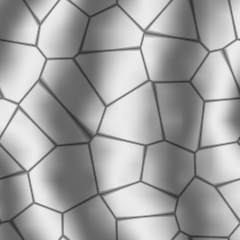
second nearest: 0.16 to 1.00, average 0.7006Marble out of three kinds of noise
const int size = 240;

// Marble is stripes that have been pushed out of shape. The stripes come
// from a sine, the pushing from Perlin noise, and the grain of the stone
// from Worley - three lines of noise, one material.
var random = new Pcg(4711);
var seeds = new float[size * size];

for (var i = 0; i < seeds.Length; i++)
    seeds[i] = (float)random.NextDouble();

var soft = PerlinNoise.Generate(seeds, size, size, octaves: 5, persistence: 0.55f);
var nearest = WorleyNoise.Generate(size, size, cells: 5, seed: 4711);
var second = WorleyNoise.Generate(size, size, cells: 5, seed: 4711, order: 2);
var marble = new float[seeds.Length];

for (var y = 0; y < size; y++)
{
    for (var x = 0; x < size; x++)
    {
        var i = y * size + x;

        // Six stripes across the picture, pushed sideways by the noise.
        var stripes = MathF.Sin((x / (float)size * 5 + soft[i] * 4) * MathF.PI);

        // Right between two points the two distances are almost equal. Only
        // there does this get small, and that draws the thin dark cracks.
        var crack = Math.Min((second[i] - nearest[i]) * 14f, 1f);

        marble[i] = Math.Clamp((0.66f + stripes * 0.26f) * (0.45f + crack * 0.55f), 0f, 1f);
    }
}

Channels.ToImage(marble, size, size).Save(Path.Combine(folder, "worley-marble.png"));

Console.WriteLine($"marble: {marble.Min():0.00} to {marble.Max():0.00}, average {marble.Average():0.00}");marble: 0.18 to 0.92, average 0.6407Good to know
- The work sits in those nine distances per pixel. On a graphics card that is exactly why Worley noise runs there in a shader: every pixel computes on its own, without knowing anything about the others.
- Saving the square root. For the comparison the squared distance is enough; the root is only needed right at the end. It still sits inside the loop here, because the code would be harder to read otherwise.
- The second example mixes three kinds of noise into marble: a sine for the grain, Perlin for bending it out of shape, Worley for the veins. That is how texture tools really work — no single kind of noise makes a material on its own.
- Related and worth a look of their own: jump flooding, which produces a complete Voronoi diagram in a few passes on the graphics card, and Poisson disk sampling, which scatters points with a minimum distance when the cell grid looks too regular.