Image processingIMG-05
Marching Squares
A field of numbers turns into a line: sixteen cases, and no more than that.
- Running time
- O(cells)
- Cases
- 16 in 2D, 256 in 3D
- Precision
- interpolated, not stair-stepped
- Result
- loose line segments
01What it is about
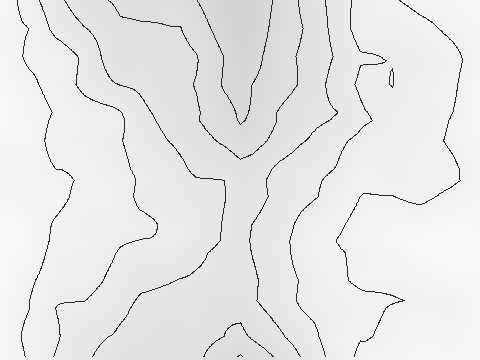
A field of numbers — heights, temperatures, brightnesses, densities — and the question where exactly a certain value runs through it. The answer is a line: the contour line of a map, the isotherm of a weather chart, the outline of an object in a CT slice.
The trick for finding it is so simple that it hardly seems like an algorithm: only ever look at four neighbouring values at a time. Each of them is either above the value being looked for or below it. That gives sixteen possible patterns, and for each of them it is settled once and for all how the line runs through that little square.

02How it works
Four corners, one index
For every cell of the field the four corners are asked and put together into four bits:
8 --- 4        corner above the value -> bit set
|     |        0 and 15: nothing to do,
1 --- 2        the line does not pass through here
The number from 0 to 15 is the lookup. It says which of the four edges the line crosses: 3 means left to right, 6 means top to bottom, and so on. Because a pattern and its opposite give the same line (only the sides are swapped), eight cases are enough for fourteen numbers.
Interpolating instead of rounding
The point where the line crosses an edge is not put in the middle but computed. If the corners read 0.2 and 0.6 and the value looked for is 0.3, the crossing sits a quarter of the way along:
part = (value − from) / (to − from)
That is the difference between a stair-stepped and a smooth line, and it costs one division. Without that line a contour would look like a pixel picture from the eighties.
The two ambiguous cases
In numbers 5 and 10 two diagonally opposite corners are above and the other two below. Here there are two equally valid answers: two separate lines that cut off either the one corner or the other. Whoever simply picks one gets holes, because the neighbouring cell may decide differently.
The usual way out is in the code here as well: the average of the four corners decides. It is the same for both cells involved, so they cannot contradict each other.
03Try it
04Implementation
// A piece of a contour line, in the coordinates of the field it was found in.
public readonly record struct Segment(float X1, float Y1, float X2, float Y2);

// A field of numbers - heights, temperatures, brightness - and the question where
// exactly a certain value runs through it. The answer is a line, and the trick to
// finding it is to look at four neighbouring values at a time. Each of them is
// either above the value or below it, which makes sixteen possible corner patterns,
// and for each of them it is settled how the line crosses that little square.
public static class MarchingSquares
{
    public static Segment[] Contour(float[] values, int width, int height, float level)
    {
        var segments = new List<Segment>();

        for (var y = 0; y < height - 1; y++)
        {
            for (var x = 0; x < width - 1; x++)
            {
                var topLeft = values[y * width + x];
                var topRight = values[y * width + x + 1];
                var bottomRight = values[(y + 1) * width + x + 1];
                var bottomLeft = values[(y + 1) * width + x];

                // One bit per corner: is it above the level or not?
                var corners = (topLeft > level ? 8 : 0)
                    | (topRight > level ? 4 : 0)
                    | (bottomRight > level ? 2 : 0)
                    | (bottomLeft > level ? 1 : 0);

                if (corners is 0 or 15)
                    continue;

                // Where the line crosses an edge is not guessed but interpolated:
                // if the corners read 0.2 and 0.6 and the level is 0.3, the crossing
                // sits a quarter of the way along. That is what makes the contour
                // smooth instead of stair-stepped.
                var top = new Segment(x + Between(topLeft, topRight, level), y, 0, 0);
                var bottom = new Segment(x + Between(bottomLeft, bottomRight, level), y + 1, 0, 0);
                var left = new Segment(x, y + Between(topLeft, bottomLeft, level), 0, 0);
                var right = new Segment(x + 1, y + Between(topRight, bottomRight, level), 0, 0);

                switch (corners)
                {
                    case 1 or 14: Add(segments, left, bottom); break;
                    case 2 or 13: Add(segments, bottom, right); break;
                    case 3 or 12: Add(segments, left, right); break;
                    case 4 or 11: Add(segments, top, right); break;
                    case 6 or 9: Add(segments, top, bottom); break;
                    case 7 or 8: Add(segments, left, top); break;

                    // Two corners across from each other are above, the other two
                    // below. Both ways of connecting them are allowed, and the
                    // average of the four decides which one is taken - that way
                    // neighbouring cells cannot contradict each other.
                    case 5 or 10:
                        var middle = (topLeft + topRight + bottomRight + bottomLeft) / 4;

                        // In case 5 the corners that are above lie top right and
                        // bottom left, in case 10 the other way round, so the same
                        // decision comes out mirrored.
                        var joinLeftToTop = middle > level == (corners == 5);

                        if (joinLeftToTop)
                        {
                            Add(segments, left, top);
                            Add(segments, bottom, right);
                        }
                        else
                        {
                            Add(segments, left, bottom);
                            Add(segments, top, right);
                        }

                        break;
                }
            }
        }

        return [.. segments];
    }

    // How far between two corners the level lies, from 0 to 1.
    private static float Between(float from, float to, float level) =>
        Math.Abs(to - from) < 1e-6f ? 0.5f : Math.Clamp((level - from) / (to - from), 0f, 1f);

    private static void Add(List<Segment> segments, Segment from, Segment to)
    {
        // When the level runs exactly through a corner, both crossings can land on
        // that same corner. Such a piece has no length and is left out.
        if (from.X1 == to.X1 && from.Y1 == to.Y1)
            return;

        segments.Add(new Segment(from.X1, from.Y1, to.X1, to.Y1));
    }
}05Contour lines of a landscape
const int width = 120;
const int height = 90;

// A landscape of Perlin noise, and the question where certain heights run
// through it. That is exactly what the contour lines of a map are.
var random = new Pcg(20240921);
var seeds = new float[width * height];

for (var i = 0; i < seeds.Length; i++)
    seeds[i] = (float)random.NextDouble();

var land = PerlinNoise.Generate(seeds, width, height, octaves: 5, persistence: 0.5f);

// Perlin noise does not use the whole range from 0 to 1, so the heights are
// stretched out first. Otherwise the lower contour lines would find nothing.
var lowest = land.Min();
var span = land.Max() - lowest;

for (var i = 0; i < land.Length; i++)
    land[i] = (land[i] - lowest) / span;

var lines = new List<Segment>();

Console.WriteLine("height  pieces of line");

foreach (var level in new[] { 0.2f, 0.35f, 0.5f, 0.65f, 0.8f })
{
    var contour = MarchingSquares.Contour(land, width, height, level);

    lines.AddRange(contour);

    Console.WriteLine($"{level,6:0.00}  {contour.Length,14}");
}

// Every piece is drawn on its own. They are not sorted into closed rings
// here - for a picture that is not needed, for a plotter it would be.
ContourRenderer.Render([.. lines], width, height, scale: 4, background: land)
    .Save(Path.Combine(folder, "contour-lines.png"));

Channels.ToImage(land, width, height).Save(Path.Combine(folder, "contour-field.png"));

Console.WriteLine($"{lines.Count} pieces of line altogether");height pieces of line
0.20 82
0.35 167
0.50 292
0.65 302
0.80 303
1146 pieces of line altogether06Good to know
- What comes out are loose segments, not closed rings. For a picture that is enough. Whoever needs the line as a vector — a plotter, an SVG, a physics edge — has to collect the ends afterwards and join them into paths.
- Marching cubes is the same idea in 3D: eight corners, 256 cases, triangles instead of lines. It comes from Lorensen and Cline (1987), was under patent until 2005, and is the reason medical 3D pictures can be built from stacks of slices at all. It has ambiguous cases too, only many more of them.
- Related: dual contouring places one point per cell instead of fixed edge crossings and hits sharp corners better; metaballs are nothing but a field of distance functions through which marching squares draws a line.
- The field in the example is Perlin noise, stretched to run from 0 to 1. Five heights give 1146 segments — and immediately look like a walking map.