Image processingIMG-03
Edge Detection
Sobel, Prewitt, Laplace and Canny: four answers to where something in a picture begins.
- Running time
- O(pixels · kernel)
- Sobel, Prewitt
- first derivative
- Laplace
- second derivative
- Canny
- four steps, 1986
01What it is about
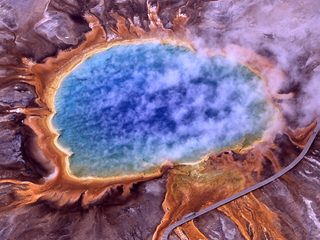
An edge is a place where brightness changes quickly. That makes looking for edges the same as looking for the steepest slope — for the derivative of the picture. But a picture is not a smooth function, it is a grid of numbers, and so the derivative is estimated: with a small matrix that is laid over every pixel.
Choosing that matrix is all that tells the classic filters apart. Sobel and Prewitt measure the slope, Laplace measures the curvature, and Canny is not a filter at all but a procedure of four steps that uses the others and turns their broad ridges into thin lines.
02How it works
The convolution underneath
Everything that happens to a picture locally works the same way: lay the matrix over every pixel, multiply it with what lies underneath, add it up. Blur, sharpen, emboss, edges — the same arithmetic, a different matrix. At the border the outermost pixel is repeated here, so that no special case is needed.
Sobel and Prewitt
Both measure the slope twice: once across, once along. The two answers together form a small arrow per pixel; its length is the strength of the edge, its direction stands at right angles to it.
Sobel across    Prewitt across
-1  0  1        -1  0  1
-2  0  2        -1  0  1
-1  0  1        -1  0  1
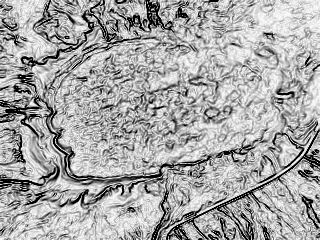
The only difference is the middle row. Sobel weights it three times as heavily, which smooths across the edge and makes the filter far less sensitive to noise. Prewitt is the more honest but more restless variant — on the example photo Sobel answers more strongly and still more cleanly.
Laplace
The Laplacian asks something else: not how steep it is, but where the slope turns over. It needs no direction, one matrix is enough:
 0  1  0
 1 -4  1
 0  1  0
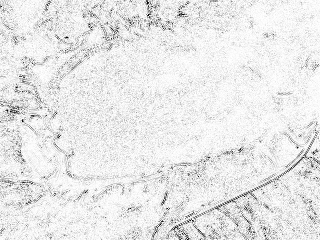
On an even ramp it answers zero, however steep that ramp is — the second derivative of a straight line is zero. That is its strength and its weakness at once: it only finds real transitions, but reacts twice as sensitively to noise. In practice it is therefore almost always preceded by a blur (Laplacian of Gaussian).
Canny in four steps
In 1986 John Canny asked what a good edge finder should even be, wrote down three demands — find every edge, report it in the right place, and only once — and derived a procedure from them:
- Blur. The gradient reacts to every speck, so the picture is calmed down first. How strongly is the one real knob.
- Gradient. Exactly as Sobel does it: how steep, and in which direction.
- Thin out. A slope is several pixels wide, an edge is a line. Only what is at least as strong as its two neighbours across the edge survives (non-maximum suppression).
- Two thresholds. Anything above the upper one is an edge for certain. Anything in between only counts when it hangs on to such a certain edge. This hysteresis is why a fading line stays whole instead of falling apart into dots.
03Try it

04Implementation
// An edge is a place where brightness changes quickly. So looking for edges means
// looking for the steepest slope - the derivative of the picture. Because a picture
// is not a smooth function but a grid of numbers, the derivative is estimated with
// a small matrix, and the choice of that matrix is what tells the classic filters
// apart.
public static class EdgeDetection
{
    // Sobel weights the middle row three times as heavily as the outer ones, which
    // smooths the result across the edge and makes it far less prone to noise.
    public static readonly float[] SobelX = [-1, 0, 1, -2, 0, 2, -1, 0, 1];
    public static readonly float[] SobelY = [-1, -2, -1, 0, 0, 0, 1, 2, 1];

    // Prewitt is the same idea without the weighting: three plain differences
    // side by side. A little sharper, a little noisier.
    public static readonly float[] PrewittX = [-1, 0, 1, -1, 0, 1, -1, 0, 1];
    public static readonly float[] PrewittY = [-1, -1, -1, 0, 0, 0, 1, 1, 1];

    // The Laplacian asks a different question: not how steep it is, but where the
    // slope turns. It needs no direction, one matrix is enough - and because it is
    // the second derivative, it reacts to noise twice as strongly.
    public static readonly float[] Laplace = [0, 1, 0, 1, -4, 1, 0, 1, 0];

    // How strongly the brightness changes at each pixel, and in which direction.
    // The two matrices measure the slope across and along the picture; together
    // they form a small arrow per pixel, and its length is the strength.
    public static (float[] Strength, float[] Direction) Gradient(
        float[] gray, int width, int height, float[] horizontal, float[] vertical)
    {
        var alongX = Convolution.Apply(gray, width, height, horizontal);
        var alongY = Convolution.Apply(gray, width, height, vertical);

        var strength = new float[gray.Length];
        var direction = new float[gray.Length];

        for (var i = 0; i < gray.Length; i++)
        {
            strength[i] = MathF.Sqrt(alongX[i] * alongX[i] + alongY[i] * alongY[i]);
            direction[i] = MathF.Atan2(alongY[i], alongX[i]);
        }

        return (strength, direction);
    }

    public static float[] Sobel(float[] gray, int width, int height) =>
        Gradient(gray, width, height, SobelX, SobelY).Strength;

    public static float[] Prewitt(float[] gray, int width, int height) =>
        Gradient(gray, width, height, PrewittX, PrewittY).Strength;

    // The Laplacian answers with a sign, so what counts is how far the answer is
    // away from zero.
    public static float[] Laplacian(float[] gray, int width, int height)
    {
        var answer = Convolution.Apply(gray, width, height, Laplace);
        var strength = new float[answer.Length];

        for (var i = 0; i < answer.Length; i++)
            strength[i] = MathF.Abs(answer[i]);

        return strength;
    }
}05The convolution underneath
// Almost everything that is done to a picture locally works the same way: lay a
// small matrix over every pixel, multiply it with what lies underneath and add
// that up. Blur, sharpen, emboss and every edge filter are the same operation
// with a different matrix.
public static class Convolution
{
    // Applies a square matrix to a grayscale picture. At the border the outermost
    // pixel is repeated, so nothing has to be treated as a special case.
    public static float[] Apply(float[] values, int width, int height, float[] kernel)
    {
        var size = (int)Math.Sqrt(kernel.Length);

        if (size * size != kernel.Length || size % 2 == 0)
            throw new ArgumentException("A kernel has to be square and of an odd size.", nameof(kernel));

        var reach = size / 2;
        var result = new float[values.Length];

        for (var y = 0; y < height; y++)
        {
            for (var x = 0; x < width; x++)
            {
                var sum = 0f;

                for (var ky = 0; ky < size; ky++)
                {
                    for (var kx = 0; kx < size; kx++)
                    {
                        var sampleX = Math.Clamp(x + kx - reach, 0, width - 1);
                        var sampleY = Math.Clamp(y + ky - reach, 0, height - 1);

                        sum += values[sampleY * width + sampleX] * kernel[ky * size + kx];
                    }
                }

                result[y * width + x] = sum;
            }
        }

        return result;
    }

    // A Gaussian blur, and a trick with it: instead of laying an n x n matrix over
    // the picture, the same bell curve is applied once horizontally and once
    // vertically. The result is identical, the work drops from n squared to 2n.
    public static float[] Blur(float[] values, int width, int height, float radius)
    {
        if (radius <= 0)
            return (float[])values.Clone();

        var bell = Bell(radius);

        return Sweep(Sweep(values, width, height, bell, horizontal: true), width, height, bell, horizontal: false);
    }

    // The bell curve, sampled at whole pixels and scaled so that its values add up
    // to one. Otherwise the picture would get brighter or darker.
    public static float[] Bell(float radius)
    {
        var reach = Math.Max(1, (int)MathF.Ceiling(radius * 3));
        var weights = new float[reach * 2 + 1];
        var sum = 0f;

        for (var i = -reach; i <= reach; i++)
        {
            var weight = MathF.Exp(-(i * i) / (2 * radius * radius));

            weights[i + reach] = weight;
            sum += weight;
        }

        for (var i = 0; i < weights.Length; i++)
            weights[i] /= sum;

        return weights;
    }

    private static float[] Sweep(float[] values, int width, int height, float[] weights, bool horizontal)
    {
        var reach = weights.Length / 2;
        var result = new float[values.Length];

        for (var y = 0; y < height; y++)
        {
            for (var x = 0; x < width; x++)
            {
                var sum = 0f;

                for (var i = 0; i < weights.Length; i++)
                {
                    var sampleX = horizontal ? Math.Clamp(x + i - reach, 0, width - 1) : x;
                    var sampleY = horizontal ? y : Math.Clamp(y + i - reach, 0, height - 1);

                    sum += values[sampleY * width + sampleX] * weights[i];
                }

                result[y * width + x] = sum;
            }
        }

        return result;
    }
}06Sobel, Prewitt, Laplace
var photo = PngImage.Load(file);

// The filters look at brightness only. Colour says nothing about edges;
// two very different colours can be exactly as bright as each other.
var gray = photo.ToBrightness();

(string Name, float[] Strength)[] filters =
[
    ("sobel", EdgeDetection.Sobel(gray, photo.Width, photo.Height)),
    ("prewitt", EdgeDetection.Prewitt(gray, photo.Width, photo.Height)),
    ("laplace", EdgeDetection.Laplacian(gray, photo.Width, photo.Height)),
];

Console.WriteLine("filter    strongest  clearly an edge");

foreach (var (name, strength) in filters)
{
    // The answers are turned round: a strong edge should be dark on white,
    // the way a pencil drawing looks.
    var drawn = new float[strength.Length];

    for (var i = 0; i < strength.Length; i++)
        drawn[i] = 1 - Math.Min(strength[i], 1f);

    Channels.ToImage(drawn, photo.Width, photo.Height)
        .Save(Path.Combine(folder, $"spring-{name}.png"));

    var strongest = strength.Max();
    var clear = strength.Count(value => value > 0.25f) * 100.0 / strength.Length;

    Console.WriteLine($"{name,-9} {strongest,9:0.00}  {clear,14:0.0} %");
}filter strongest clearly an edge
sobel 3.19 55.7 %
prewitt 2.32 39.3 %
laplace 1.43 6.8 %07Canny in four steps
// John Canny asked in 1986 what a good edge detector would even be, wrote down
// three demands - find every edge, put it in the right place, report it only once -
// and derived a procedure from them. It is not a matrix but a chain of four steps,
// and it still is the standard today.
public static class Canny
{
    public static float[] Detect(float[] gray, int width, int height, float blur, float low, float high)
    {
        // 1. Blur. The gradient reacts to every speck of noise, so the picture is
        // calmed down first. How strongly is the one real knob of the method.
        var calm = Convolution.Blur(gray, width, height, blur);

        // 2. Gradient, exactly as Sobel does it: how steep, and in which direction.
        var (strength, direction) = EdgeDetection.Gradient(
            calm, width, height, EdgeDetection.SobelX, EdgeDetection.SobelY);

        // 3. Thin the ridges out. A slope is several pixels wide, but an edge is a
        // line. Only the pixel at the top of the ridge survives.
        var thin = Thin(strength, direction, width, height);

        // 4. Two thresholds. Anything above the upper one is an edge for certain.
        // Anything between the two only counts when it hangs on to such a
        // certain edge - that keeps a fading line whole instead of dotting it.
        return Follow(thin, width, height, low, high);
    }

    // Non-maximum suppression: a pixel only stays when it is at least as strong as
    // its two neighbours across the edge. The direction is rounded to one of four,
    // because there are no other neighbours on a grid.
    private static float[] Thin(float[] strength, float[] direction, int width, int height)
    {
        var thin = new float[strength.Length];

        for (var y = 1; y < height - 1; y++)
        {
            for (var x = 1; x < width - 1; x++)
            {
                var here = y * width + x;
                var angle = direction[here] * 180 / MathF.PI;

                if (angle < 0)
                    angle += 180;

                var (dx, dy) = angle switch
                {
                    < 22.5f or >= 157.5f => (1, 0),
                    < 67.5f => (1, 1),
                    < 112.5f => (0, 1),
                    _ => (-1, 1),
                };

                var before = strength[(y - dy) * width + x - dx];
                var after = strength[(y + dy) * width + x + dx];

                if (strength[here] >= before && strength[here] >= after)
                    thin[here] = strength[here];
            }
        }

        return thin;
    }

    // Hysteresis: start at the certain edges and walk along everything that is at
    // least halfway strong and touches them.
    private static float[] Follow(float[] thin, int width, int height, float low, float high)
    {
        var edges = new float[thin.Length];
        var pending = new Stack<int>();

        for (var i = 0; i < thin.Length; i++)
        {
            if (thin[i] >= high)
            {
                edges[i] = 1;
                pending.Push(i);
            }
        }

        while (pending.Count > 0)
        {
            var pixel = pending.Pop();
            var x = pixel % width;
            var y = pixel / width;

            for (var dy = -1; dy <= 1; dy++)
            {
                for (var dx = -1; dx <= 1; dx++)
                {
                    var nx = x + dx;
                    var ny = y + dy;

                    if (nx < 0 || ny < 0 || nx >= width || ny >= height)
                        continue;

                    var neighbour = ny * width + nx;

                    if (edges[neighbour] > 0 || thin[neighbour] < low)
                        continue;

                    edges[neighbour] = 1;
                    pending.Push(neighbour);
                }
            }
        }

        return edges;
    }
}08Canny, set three ways
var photo = PngImage.Load(file);
var gray = photo.ToBrightness();

// Three settings of the same procedure. The blur decides how much detail
// survives, the two thresholds decide what still counts as an edge.
(string Name, float Blur, float Low, float High)[] settings =
[
    ("fine", 1.0f, 0.08f, 0.20f),
    ("calm", 2.0f, 0.08f, 0.20f),
    ("strict", 2.0f, 0.15f, 0.35f),
];

Console.WriteLine("setting  blur   low  high  edge pixels");

foreach (var (name, blur, low, high) in settings)
{
    var edges = Canny.Detect(gray, photo.Width, photo.Height, blur, low, high);
    var drawn = new float[edges.Length];

    for (var i = 0; i < edges.Length; i++)
        drawn[i] = 1 - edges[i];

    Channels.ToImage(drawn, photo.Width, photo.Height)
        .Save(Path.Combine(folder, $"spring-canny-{name}.png"));

    Console.WriteLine(
        $"{name,-7}  {blur,4:0.0}  {low,4:0.00}  {high,4:0.00}  " +
        $"{edges.Sum() * 100 / edges.Length,10:0.0} %");
}setting blur low high edge pixels
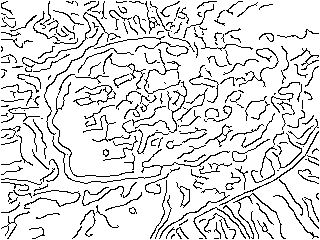
fine 1.0 0.08 0.20 24.4 %
calm 2.0 0.08 0.20 12.9 %
strict 2.0 0.15 0.35 6.1 %09Good to know
- Colour says nothing about edges: two completely different colours can be exactly as bright as each other. All four methods therefore work on brightness — and miss precisely those cases. For colour edges one computes the gradient in every channel and takes the strongest.
- None of this finds objects. What comes out are bright pixels, not lines and certainly not shapes. The next step would be the Hough transform (straight lines and circles out of points) or a contour tracing.
- The trick with the separable Gaussian inside Canny: instead of laying an n × n matrix over the picture, the same bell curve is applied once horizontally and once vertically. The result is identical, the work drops from n² to 2n.
- The numbers in the example show how much the settings matter: the same code, once 24 % edge pixels, once 6 %. There is no correct choice — only one that fits the purpose.