Image processingIMG-04
Bloom
Bright things spill over their edges — a flaw of optics, rebuilt in three lines.
- Running time
- O(pixels · radius)
- Steps
- cut out, blur, add
- Blur
- separable Gaussian
- Arithmetic
- adding, not mixing
01What it is about
A real lens is not perfect. Very bright light scatters in the glass, in the sensor and in the eye, and lays a soft glow around itself. Photographers know it as blooming, game developers rebuild it on purpose, because a screen simply cannot go brighter than white: if a lamp is supposed to blaze although it is already white, the glow around it has to do the work.
The method for it is remarkably simple and told in three steps: cut out what is bright — blur it wide — add it back on top.


02How it works
What counts as light?
A threshold separates light sources from the rest. What matters is not to take everything above the threshold, but only the part above it:
light = brightness > threshold ? value · (brightness − threshold) / (1 − threshold) : 0
That way a light source starts to glow gently instead of jumping out the moment it reaches the threshold. On photographs the threshold has to sit high, otherwise half the picture lights up and everything just looks foggy.
Blurring
The glow itself is a Gaussian blur, and a wide one. Because the bell curve is separable, it is applied once horizontally and once vertically instead of as one large matrix — the same result, n² becomes 2n. At a radius of 9 pixels that is the difference between 361 and 38 multiplications per pixel.
Adding, not mixing
The last step is where it can go wrong: light is added, not blended. Two lamps next to each other are brighter than one; a blend would weigh one against the other instead. That is why the code says value + halo · strength and not some mixture, and why the result is clamped to 1 at the end.
The three knobs
- Threshold — from what point something counts as light. Too low, and the picture turns milky.
- Radius — how far the glow reaches. Large looks like fog, small like polish.
- Strength — how much of it comes back. The blur spreads the energy over an area, so the strength has to grow with the radius or nothing is left to see.
03Try it
04Implementation
// A real lens is not perfect: bright light scatters in the glass, in the sensor and
// in the eye, and lays a soft halo around itself. Bloom fakes that in three steps -
// cut out what is bright, blur it wide, add it back on top.
public static class Bloom
{
    // threshold says from which brightness on a pixel counts as a light source,
    // radius how far the halo reaches, strength how much of it is added back.
    public static PngImage Add(PngImage image, float threshold, float radius, float strength)
    {
        var brightness = image.ToBrightness();
        var channels = new float[3][];

        for (var channel = 0; channel < 3; channel++)
        {
            var values = Channels.Of(image, channel);
            var lights = new float[values.Length];

            // Only what is above the threshold is kept, and only the part that lies
            // above it. That way a light source fades in instead of jumping out.
            for (var i = 0; i < values.Length; i++)
                lights[i] = brightness[i] > threshold ? values[i] * (brightness[i] - threshold) / (1 - threshold) : 0;

            var halo = Convolution.Blur(lights, image.Width, image.Height, radius);
            var result = new float[values.Length];

            // Adding, not mixing: light adds up, it does not replace anything.
            for (var i = 0; i < values.Length; i++)
                result[i] = Math.Clamp(values[i] + halo[i] * strength, 0, 1);

            channels[channel] = result;
        }

        return Channels.ToImage(channels[0], channels[1], channels[2], image.Width, image.Height);
    }
}05Lights at night
const int width = 240;
const int height = 160;

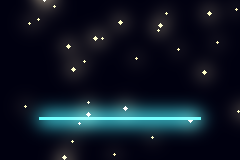
// A night scene in a few lines: a dark ground, a row of lamps and one bright
// bar. Every light is a hard disc - the glow around it is not drawn here,
// that is exactly what bloom is for.
var random = new Pcg(20240921);
var channels = new[] { new float[width * height], new float[width * height], new float[width * height] };

void Light(int centreX, int centreY, float radius, float red, float green, float blue)
{
    for (var y = (int)(centreY - radius); y <= centreY + radius; y++)
    {
        for (var x = (int)(centreX - radius); x <= centreX + radius; x++)
        {
            if (x < 0 || y < 0 || x >= width || y >= height)
                continue;

            if ((x - centreX) * (x - centreX) + (y - centreY) * (y - centreY) > radius * radius)
                continue;

            channels[0][y * width + x] = red;
            channels[1][y * width + x] = green;
            channels[2][y * width + x] = blue;
        }
    }
}

for (var i = 0; i < channels[0].Length; i++)
    channels[2][i] = 0.06f; // the night is not black, it is very dark blue

for (var lamp = 0; lamp < 30; lamp++)
    Light(random.Next(width), random.Next(height), 1 + random.Next(2), 1f, 0.92f, 0.7f);

for (var x = 40; x < 200; x++)
    Light(x, 118, 1.5f, 0.3f, 1f, 1f);

var scene = Channels.ToImage(channels[0], channels[1], channels[2], width, height);

scene.Save(Path.Combine(folder, "bloom-night.png"));

Console.WriteLine("setting  threshold  radius  strength  brighter pixels");

foreach (var (name, threshold, radius, strength) in new[]
{
    ("soft", 0.5f, 3f, 2.5f),
    ("wide", 0.5f, 9f, 6f),
})
{
    var glowing = Bloom.Add(scene, threshold, radius, strength);

    glowing.Save(Path.Combine(folder, $"bloom-night-{name}.png"));

    var brighter = 0;

    for (var i = 0; i < width * height; i++)
    {
        if (glowing.Pixels[i * 4 + 1] > scene.Pixels[i * 4 + 1] + 2)
            brighter++;
    }

    Console.WriteLine(
        $"{name,-7}  {threshold,9:0.00}  {radius,6:0}  {strength,8:0.0}  " +
        $"{brighter * 100.0 / (width * height),13:0.0} %");
}setting threshold radius strength brighter pixels
soft 0.50 3 2.5 18.7 %
wide 0.50 9 6.0 66.9 %06On a photograph
var photo = PngImage.Load(file);

// On a photograph the threshold has to sit high, otherwise the whole picture
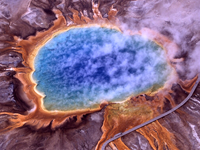
// starts to glow and only looks foggy. Here only the steam is above it.
var glowing = Bloom.Add(photo, threshold: 0.72f, radius: 8f, strength: 0.9f);

glowing.Save(Path.Combine(folder, "spring-bloom.png"));

var brightness = photo.ToBrightness();
var lights = brightness.Count(value => value > 0.72f);

Console.WriteLine($"{lights * 100.0 / brightness.Length:0.0} % of the picture counts as a light source");
Console.WriteLine($"average brightness before {brightness.Average():0.000}, " +
$"after {glowing.ToBrightness().Average():0.000}");5.0 % of the picture counts as a light source
average brightness before 0.446, after 0.45207Good to know
- In games this step runs at the end of rendering, in HDR space: there a lamp may have the value 40 while the screen stops at 1. The threshold then sits at 1, and everything above it is by definition too bright to display — and that is exactly what blooms.
- It gets faster when it gets smaller. In practice the glow is not computed at full resolution; the bright picture is halved several times, every level is blurred and all of them are added back. That costs a fraction and looks better, because several radii lie on top of each other.
- Related effects from the same workshop: lens flare (reflections in the lens groups, mirrored around the centre of the picture), streaks (blurring in one direction only, which gives the stars around street lights) and glare from the shape of the aperture.
- The night scene in the pictures above is generated: a few bright discs on dark ground, without any glow at all. Everything shining around them comes out of these three steps.