Image processingIMG-02
Dithering
Few colours that look like many from a distance.
- Running time
- O(pixels)
- Method
- Error diffusion
- Extra memory
- O(pixels)
- Error goes to
- 4 neighbours: 7/16, 3/16, 5/16, 1/16
01What it is about
A screen with 16 colours, a GIF with 256, an e-book reader with black and white, a receipt printer with a single colour of ink: again and again a picture has to make do with far fewer colours than it really has. If every pixel simply takes the nearest allowed colour, the picture falls apart into patches. A soft sky turns into hard stripes, a gradient turns into steps. That is banding, and it is impossible to miss.
Dithering solves it with a trade: it swaps the large patches for a fine grain. Afterwards the single colour is further off than before, but averaged over a small area it is much closer — and that is exactly how the eye looks at a picture.
The best known method comes from Robert Floyd and Louis Steinberg (1976) and is surprisingly short: it walks the pixels one after another and hands the mistake it just made on to the neighbours that are still to come.
02How it works
Deciding which colours are allowed
levels says how many values a channel may take. With two levels red is either 0 or 255, with three levels 128 joins them. Because that holds for red, green and blue alike, two levels allow eight colours, three levels 27 and four levels 64.
Snap rounds a value to the nearest allowed level. On its own that is plain quantisation — and plain quantisation is what makes the patches.
Handing the error on
The trick is not to throw the rounding error away. If a pixel wanted to be 0.4 and became 0, then 0.4 are left over, and those 0.4 are spread over the neighbours that have not been dealt with yet:
        X    7/16
 3/16  5/16  1/16
X is the pixel being worked on, the picture is walked line by line from left to right. The four parts add up to exactly 16/16. Nothing is lost, nothing is invented — which is why the average brightness of the picture survives, even though every single pixel is off.
The neighbour to the right gets the largest share at 7/16, because it is next in line. The rest goes into the following line, weighted towards the pixel directly below.
The ordered variant
It also works without handing anything on. In ordered dithering every pixel is nudged up or down by a fixed amount before it is rounded, and that amount comes from a small matrix. The classic one is by Bryce Bayer (1973):
 0   8   2  10
12   4  14   6
 3  11   1   9
15   7  13   5
The matrix repeats over the whole picture. Neighbouring numbers inside it sit as far apart as possible, which keeps the pattern even. The result is a visibly woven grid instead of a random grain.
The advantage: every pixel is independent of all the others. That can be computed in parallel, in a shader, in any order at all. The drawback: the pattern is visible.
Why this works
Both methods do the same thing. They push the error into high frequencies — into a fine grain that changes from pixel to pixel. Eye, print screen and display are all low-pass filters: they average over small areas. What comes through is the average, and the average is right.
03Try it

04Implementation
// A picture that may only use a few colours falls apart into patches: everything that
// lies close together lands on the same colour, and soft transitions turn into hard
// steps. Dithering trades those patches for a fine grain that the eye mixes back
// together into the colour that was meant.
public static class Dithering
{
    // Floyd and Steinberg, 1976. Every pixel is set to the nearest colour that is
    // still allowed, and the difference between the wanted and the used colour is
    // handed on to the neighbours that are still to come.
    public static PngImage FloydSteinberg(PngImage image, int levels)
    {
        var channels = ToChannels(image, levels);

        for (var y = 0; y < image.Height; y++)
        {
            for (var x = 0; x < image.Width; x++)
            {
                for (var channel = 0; channel < 3; channel++)
                {
                    var index = ((y * image.Width + x) * 3) + channel;
                    var wanted = channels[index];
                    var used = Snap(wanted, levels);

                    channels[index] = used;

                    // The error is split over four neighbours. Most of it goes to the
                    // right, the rest into the line below; together the parts add up
                    // to the whole error, so nothing is lost and nothing invented.
                    var error = wanted - used;

                    Hand(channels, image, x + 1, y, channel, error * 7f / 16f);
                    Hand(channels, image, x - 1, y + 1, channel, error * 3f / 16f);
                    Hand(channels, image, x, y + 1, channel, error * 5f / 16f);
                    Hand(channels, image, x + 1, y + 1, channel, error * 1f / 16f);
                }
            }
        }

        return ToImage(channels, image);
    }

    // The other school: instead of passing the error on, every pixel is nudged up or
    // down by a fixed amount before it is snapped. The amount comes from a small
    // matrix that repeats over the picture, which is why the result looks woven.
    public static PngImage Ordered(PngImage image, int levels)
    {
        var channels = ToChannels(image, levels);
        var step = 1f / (levels - 1);

        for (var y = 0; y < image.Height; y++)
        {
            for (var x = 0; x < image.Width; x++)
            {
                // The matrix value runs from 0 to 15, the nudge from minus half a step
                // to plus half a step.
                var nudge = ((Matrix[(y % 4) * 4 + (x % 4)] + 0.5f) / 16f - 0.5f) * step;

                for (var channel = 0; channel < 3; channel++)
                {
                    var index = ((y * image.Width + x) * 3) + channel;
                    channels[index] = Snap(channels[index] + nudge, levels);
                }
            }
        }

        return ToImage(channels, image);
    }

    // The same reduction without any dithering: every pixel simply takes the nearest
    // allowed colour. This is what the two above are compared against.
    public static PngImage Quantize(PngImage image, int levels)
    {
        var channels = ToChannels(image, levels);

        for (var index = 0; index < channels.Length; index++)
            channels[index] = Snap(channels[index], levels);

        return ToImage(channels, image);
    }

    // Bayer's 4 x 4 matrix. Neighbouring numbers sit as far apart as possible, so the
    // pattern stays even and does not clump together anywhere.
    private static readonly int[] Matrix =
    [
        0, 8, 2, 10,
        12, 4, 14, 6,
        3, 11, 1, 9,
        15, 7, 13, 5,
    ];

    // The allowed values of a channel lie evenly spread between 0 and 1: with three
    // levels those are 0, 0.5 and 1. Snap picks the nearest of them.
    private static float Snap(float value, int levels)
    {
        var steps = levels - 1;

        return Math.Clamp(MathF.Round(value * steps) / steps, 0f, 1f);
    }

    // Adds a part of the error to a neighbour, as long as that neighbour exists.
    private static void Hand(float[] channels, PngImage image, int x, int y, int channel, float part)
    {
        if (x < 0 || y < 0 || x >= image.Width || y >= image.Height)
            return;

        channels[((y * image.Width + x) * 3) + channel] += part;
    }

    // Red, green and blue as values from 0 to 1. The error diffusion has to work on
    // fractions, a byte per channel would round it away immediately.
    private static float[] ToChannels(PngImage image, int levels)
    {
        ArgumentOutOfRangeException.ThrowIfLessThan(levels, 2);

        var channels = new float[image.Width * image.Height * 3];

        for (var pixel = 0; pixel < image.Width * image.Height; pixel++)
        {
            for (var channel = 0; channel < 3; channel++)
                channels[pixel * 3 + channel] = image.Pixels[pixel * 4 + channel] / 255f;
        }

        return channels;
    }

    private static PngImage ToImage(float[] channels, PngImage original)
    {
        var pixels = new byte[original.Width * original.Height * 4];

        for (var pixel = 0; pixel < original.Width * original.Height; pixel++)
        {
            for (var channel = 0; channel < 3; channel++)
                pixels[pixel * 4 + channel] = (byte)MathF.Round(channels[pixel * 3 + channel] * 255f);

            pixels[pixel * 4 + 3] = original.Pixels[pixel * 4 + 3];
        }

        return new PngImage { Width = original.Width, Height = original.Height, Pixels = pixels };
    }
}05Fewer colours, step by step
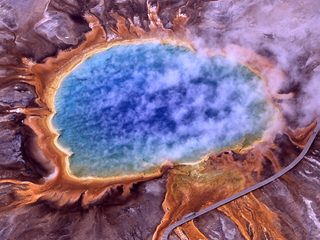
// file points to a colour photo, 320 x 240 pixels.
var photo = PngImage.Load(file);

// Levels is how many values a channel may take. Two levels leave eight
// colours in total, three levels leave 27, four leave 64.
foreach (var levels in new[] { 2, 3, 4 })
{
    var dithered = Dithering.FloydSteinberg(photo, levels);
    var target = Path.Combine(folder, $"grand-prismatic-spring-{levels}.png");

    dithered.Save(target);

    Console.WriteLine(
        $"{levels} levels: {levels * levels * levels,3} colours allowed, " +
        $"{dithered.ColourCount(),3} used, {new FileInfo(target).Length / 1024,3} KiB");
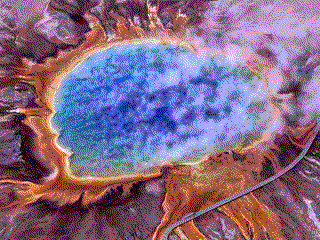
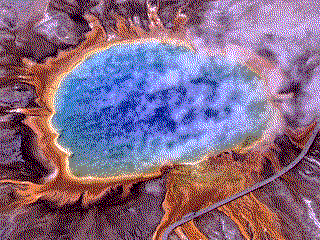
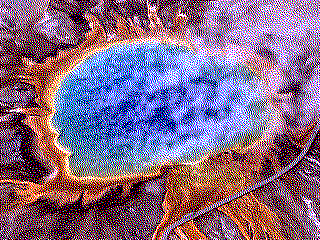
}2 levels: 8 colours allowed, 8 used, 26 KiB
3 levels: 27 colours allowed, 25 used, 28 KiB
4 levels: 64 colours allowed, 47 used, 31 KiB06How big is the mistake really?
var photo = PngImage.Load(file);

// Two ways of measuring the mistake: pixel by pixel, and over squares of
// 4 x 4 pixels. The second one is closer to what the eye does, because it
// averages over a small area before it judges.
Console.WriteLine("levels  colours  method      pixel   4 x 4");

foreach (var levels in new[] { 2, 3, 4 })
{
    (string Name, PngImage Result)[] ways =
    [
        ("plain", Dithering.Quantize(photo, levels)),
        ("ordered", Dithering.Ordered(photo, levels)),
        ("diffused", Dithering.FloydSteinberg(photo, levels)),
    ];

    foreach (var (name, result) in ways)
    {
        Console.WriteLine(
            $"{levels,6}  {levels * levels * levels,7}  {name,-8}  " +
            $"{Error(photo, result, 1),6:0.0}  {Error(photo, result, 4),6:0.0}");
    }
}

// The average difference to the original, measured over squares of the given
// size. Size 1 compares single pixels, size 4 compares small areas.
static double Error(PngImage original, PngImage result, int size)
{
    var sum = 0.0;
    var squares = 0;

    for (var y = 0; y + size <= original.Height; y += size)
    {
        for (var x = 0; x + size <= original.Width; x += size)
        {
            for (var channel = 0; channel < 3; channel++)
            {
                var difference = 0;

                for (var offsetY = 0; offsetY < size; offsetY++)
                {
                    for (var offsetX = 0; offsetX < size; offsetX++)
                    {
                        var pixel = (((y + offsetY) * original.Width) + x + offsetX) * 4 + channel;
                        difference += original.Pixels[pixel] - result.Pixels[pixel];
                    }
                }

                sum += Math.Abs(difference) / (double)(size * size);
                squares++;
            }
        }
    }

    return sum / squares;
}levels colours method pixel 4 x 4
2 8 plain 80.5 63.8
2 8 ordered 103.0 7.8
2 8 diffused 102.1 8.3
3 27 plain 34.1 22.1
3 27 ordered 44.6 4.9
3 27 diffused 42.6 4.3
4 64 plain 21.0 11.6
4 64 ordered 28.1 3.6
4 64 diffused 25.8 2.907Good to know
- The second example measures exactly that. Pixel by pixel the dithered picture is worse than blunt quantisation, averaged over 4 × 4 pixels it is about eight times better. Both numbers stand next to each other in the output.
- Dithered noise is hard to compress: neighbouring pixels are never equal any more, and equal neighbours are what run-length encoding lives on. The rescue here is the palette: the pictures above use at most 64 colours, so one byte per pixel plus a colour table is enough. The PNG writer of the solution notices that by itself, which is why the files are 26 to 31 KiB instead of about 150.
- A classic extension is serpentine scanning: every second line is walked backwards. It keeps the error from always drifting in the same direction and leaving worm-like traces.
- Atkinson dithering (Apple, 1984) spreads only
6/8of the error and drops the rest. The picture loses contrast at the extremes but looks crisper — the look of the first Macintosh screens. - Strictly the error should be computed in linear light rather than on the sRGB values, as is done here and in most implementations. In the midtones the difference is small, in the dark parts it shows.
- Dithering is still current wherever output devices know only a few states: e-ink, thermal printers, LED matrices, laser cutters, embroidery machines. And in games as a style, because it looks like 1990.
- The source picture shows the Grand Prismatic Spring in Yellowstone. Its colours come from mats of bacteria that build different pigments depending on the water temperature — orange and brown around 50 °C at the rim, deep blue above 70 °C in the middle, where almost nothing lives any more. The photo was taken by the National Park Service and is in the public domain.